Zero‑Trust Security: Why the Old Perimeter Model Is Dead
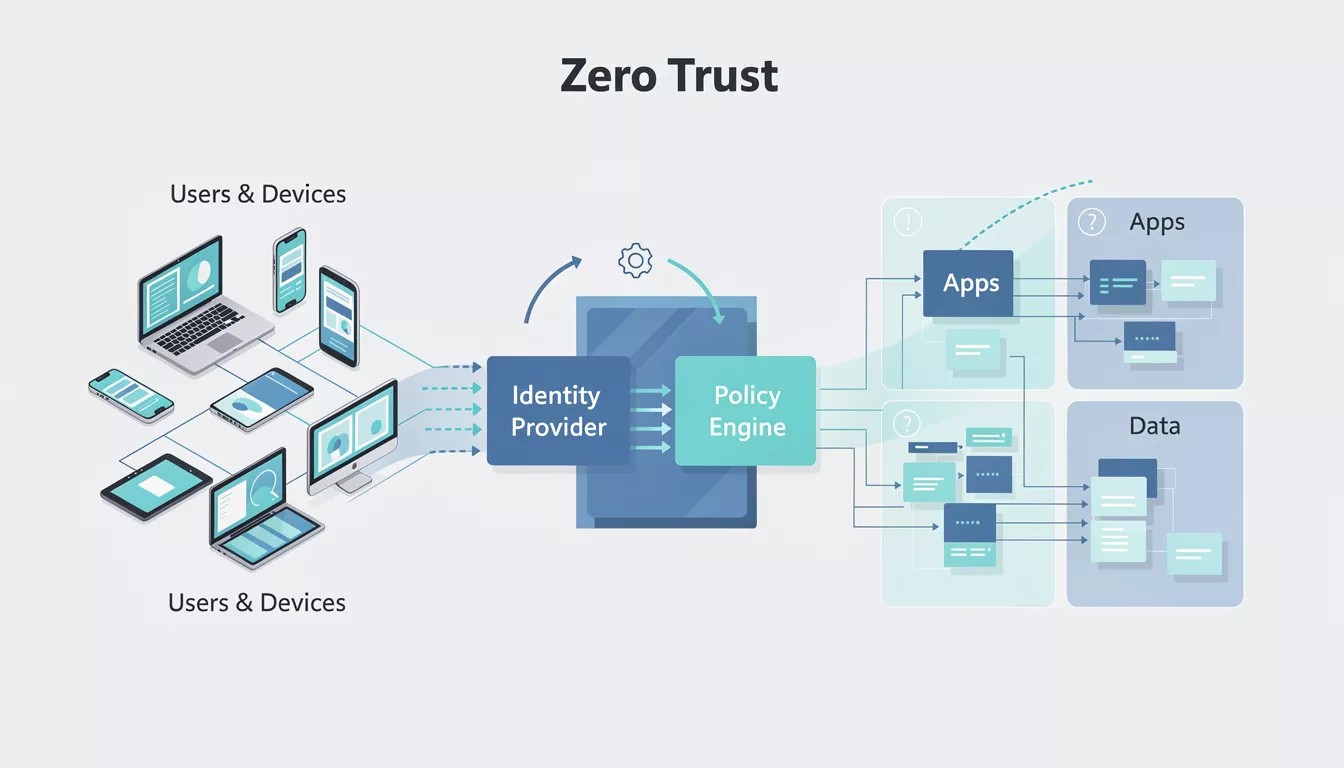
Zero‑Trust Security: Why the Old Perimeter Model Is Dead Traditional security models assumed that once a user or device was “inside” the network, it could be trusted. In an era of remote work, cloud services and sophisticated attackers, that assumption is dangerously outdated. Zero‑trust securit...
Zero‑Trust Security: Why the Old Perimeter Model Is Dead
Traditional security models assumed that once a user or device was “inside” the network, it could be trusted. In an era of remote work, cloud services and sophisticated attackers, that assumption is dangerously outdated. Zero‑trust security replaces it with a simple idea: never trust, always verify.
Instead of relying on a single strong perimeter, zero‑trust continuously validates every user, device and action, regardless of location.
Core Principles of Zero‑Trust
Zero‑trust is more than a product; it is a set of architectural and cultural principles.
Key principles:
- Verify explicitly: Authenticate and authorise based on all available data points, including user identity, device health, location and workload.
- Least privilege access: Limit user and application access to only what is necessary, and only for as long as needed.
- Assume breach: Design systems on the assumption that attackers may already be present, and focus on limiting lateral movement.
These ideas guide policy, technology selection and daily operations.
Limitations of Perimeter‑Based Security
The old model relied on firewalls and VPNs to protect an internal network that was mostly on‑premises. This struggles in modern environments where:
- Employees connect from home networks and personal devices.
- Applications run in multiple clouds and SaaS platforms.
- Partners and contractors need access to specific systems.
Once attackers breach the perimeter—via phishing, a vulnerable VPN appliance or stolen credentials—they can often move freely, accessing sensitive data with minimal detection.
Components of a Zero‑Trust Architecture
Zero‑trust is implemented through a combination of technologies and practices.
Identity and access management (IAM)
Centralised identity verification is foundational:
- Single Sign‑On (SSO) with strong authentication methods.
- Multi‑factor authentication across critical systems.
- Role‑based and attribute‑based access control (RBAC/ABAC) to define who can do what, under which conditions.
Device and endpoint security
Zero‑trust considers device posture before granting access:
- Endpoint detection and response (EDR) tools to monitor behaviour.
- Device compliance checks (OS version, security patches, encryption, antivirus).
- Conditional access policies (e.g., block access from non‑compliant devices).
Network segmentation and micro‑segmentation
Rather than a flat network, zero‑trust segments resources:
- Sensitive systems (databases, finance apps) placed in restricted segments.
- Strict access controls enforced between segments.
- Micro‑segmentation at the workload or application level where feasible.
Data and Application‑Level Security
Zero‑trust also focuses on protecting data itself, not just the paths leading to it.
Approaches:
- Classifying data (public, internal, confidential, highly sensitive).
- Applying encryption at rest and in transit.
- Using application‑level access controls and auditing.
Monitoring and logging play a key role—continuous visibility into who accessed what, when and from where.
Steps to Start Implementing Zero‑Trust
Adopting zero‑trust is a journey, not an overnight switch.
Practical roadmap:
- Inventory identities, devices and applications
- Understand who needs access to what and from where.
- Strengthen identity and MFA
- Roll out MFA to all privileged and remote accounts first.
- Segment critical assets
- Isolate crown jewels (finance, HR, IP) and restrict access.
- Introduce conditional access
- Block risky logins (e.g., strange locations or devices) and require extra checks.
- Improve visibility
- Centralise logs, deploy EDR, and set up alerting for unusual behaviour.
Organisations can start small—one app, one user group—and expand.
Challenges and Misconceptions
Zero‑trust is sometimes misunderstood as “trust nothing, block everything,” but it is about dynamic, context‑aware trust decisions, not paralysis.
Challenges include:
- Legacy systems that don’t support modern authentication.
- Cultural resistance to perceived “friction” in user workflows.
- Complexity in managing policies across hybrid environments.
Success depends on clear communication, incremental rollouts and user‑friendly solutions.
Related Articles

13 Free Unit Converters Online - Length, Weight, Temperature & More
Unit conversions are one of those tasks that seem simple until you're staring at an unfamiliar measurement system. Whether you're converting a recipe from cups to milliliters, figuring out fuel efficiency in different countries, or translating file sizes between storage standards, having reliable c...

10 Free Text & String Tools Online - Word Counter, Case Converter & More
Working with text is a fundamental part of virtually every profession. Writers need to count words and meet character limits. Developers need to encode strings and compare code versions. Marketers need URL-friendly slugs for SEO. Designers need placeholder text for mockups. LankaWebsites offers...

11 Free Math Calculators Online - Fractions, GPA, Scientific Calculator & More
Mathematics powers everything from student homework to professional engineering. But not everyone has a scientific calculator handy, and manual calculations are prone to errors. Whether you're solving fractions, checking prime numbers, calculating GPA, or running statistical analysis, the right too...

12 Free Health & Fitness Calculators Online - BMI, Calorie, Macro & More
Managing your health effectively requires data. How many calories should you eat to reach your goals? What's your ideal weight range? How much water do you actually need daily? These questions have answers, but finding them usually means visiting a doctor or hiring a nutritionist. LankaWebsites...